A web viewer for Packet Tracer files and network captures. I built it so someone outside networking can open a network and understand it without installing anything. This is how it reads a format nobody documented, and what I decided so the diagram makes sense.
Built with
JavaScript, no dependencies
Runs in
The browser, no backend
Opens
.pkt, .pka, .pkz, .pcap and .pcapng
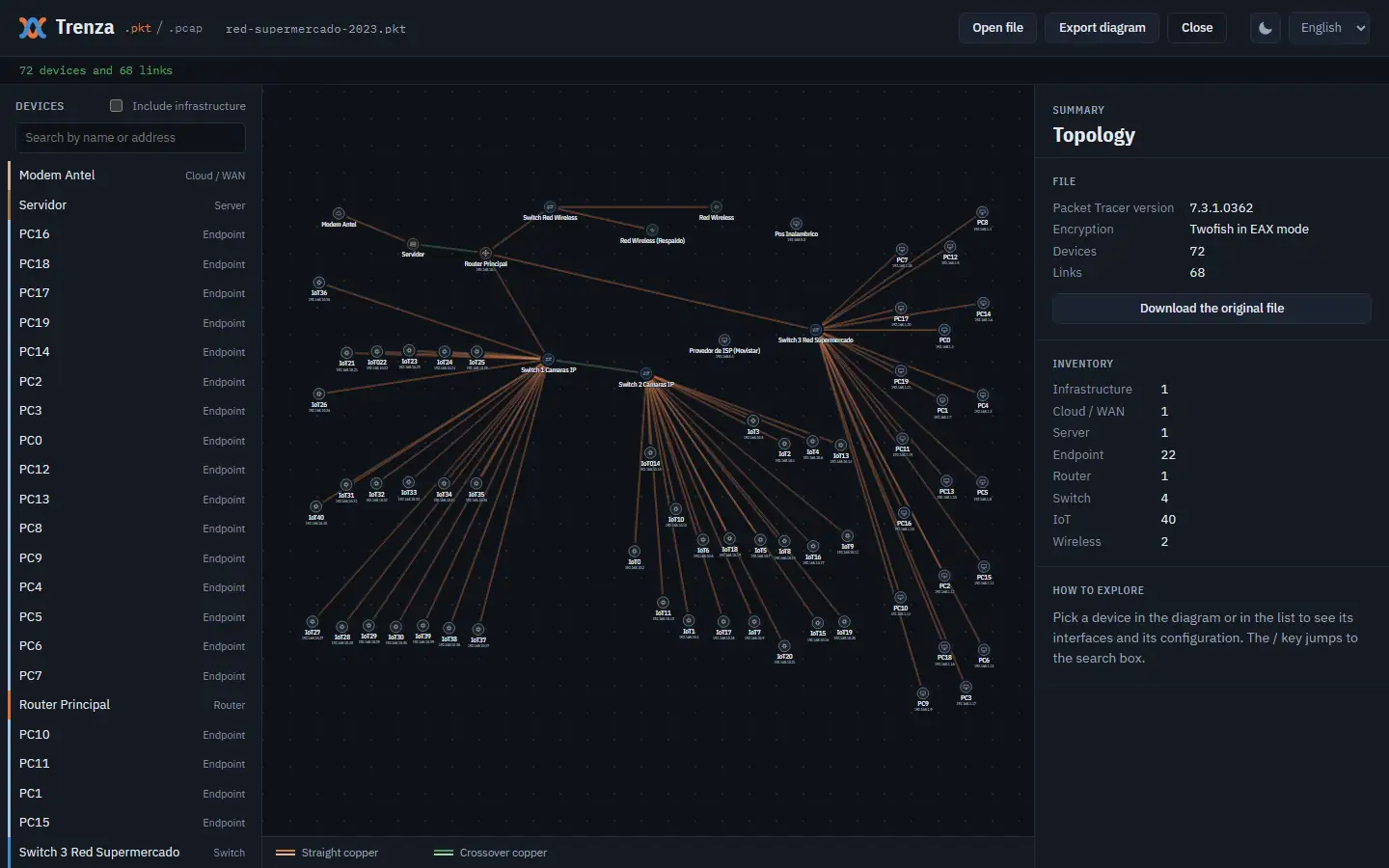
The sample network is the supermarket I designed in 2023, open in Trenza.
The problem
A Packet Tracer file only opens in Packet Tracer: you have to install the program and sign in, even just to look at a network. If I send a network to someone outside the field, they can't see it. Trenza opens it in the browser, and the file is read on the visitor's own computer: it never gets uploaded to a server.
Four layers
The .pkt format is undocumented. Two projects worked it out before me, pka2xml and ptexplorer; I reimplemented the reading in JavaScript so it runs in the browser. Inside there is an XML file wrapped in four layers, which Trenza undoes in reverse order:
.pkt file
1 · outer XOR, file reversed
2 · Twofish-EAX
3 · inner XOR
4 · zlib
XML
An outer obfuscation: the file is reversed, and every byte goes through an XOR with a value that depends on its position and on the total length.
Twofish in EAX mode, with a fixed key and nonce: 16 bytes of 0x89 and 16 bytes of 0x10.
Another obfuscation, by position, over the decrypted text.
zlib, with the uncompressed size in the first 4 bytes.
Browsers don't ship Twofish: WebCrypto doesn't include it. I wrote it by hand and test it against the vectors from the original paper. zlib is handled by DecompressionStream, which is what sets the supported browsers: Safari 16.4, Chrome 80 and Firefox 113 and up. Files from older versions only have the last two layers, and a .pkz is a ZIP with the .pkt inside; Trenza opens all three.
From XML to a network
With the XML in hand, a different job starts. Device positions are the ones Packet Tracer saved, so the diagram looks like the one its author built. Some data has to be cross-referenced: for VLANs, the XML stores the number and the name, but which port belongs to which comes from each switch's running-config. And up to version 5 devices have no identifier, so links refer to them by their place in the list.
Making it readable
In a network diagram the hard part is the labels. The widest one is almost always the IP address, and it decides how far apart the devices go. That's why it uses a condensed typeface: it takes less room and, on the same screen, comes out larger.
The drawing width is found by trying steps of 50 units until no label overlaps another. A binary search doesn't work, because the result isn't monotonic: widening also changes the vertical spacing. With steps of 300 the search skipped the right size and the text ended up 42% smaller. No label is ever hidden: the layout is decided once when the file opens, and zooming only scales it.
Making it fast
The 21 modules are requested together with modulepreload. Before, they loaded in a cascade, four levels of imports deep, and the page took 1154 ms to be ready; now it takes 464.
Decrypting the 110 kB sample network takes 29 ms. In Chrome, that 71-device network opens in 0.2 s, and one with over a thousand devices in 1.4 s.
With captures, the cost is whatever runs per packet. With 100,000 packets, building each packet's fields only when it's selected, and not creating a DataView per packet, brought dissection down from 201 to 81 ms and opening from 291 to 131.
How I test it
I tested it with real files saved in Packet Tracer 5.3.3, 7.2.1, 7.3.0, 7.3.1, 8.1.0, 8.2.1 and 9.0.1, from 2 to 72 devices, and with the same files saved as .pkz. The automated tests, with node:test, cover decryption, reading captures and device configurations, and the diagram layout, and they run on every push.
What it doesn't do
It's only a viewer: editing or simulating a network still takes Packet Tracer.
Trenza is an independent project, not affiliated with the maker of Packet Tracer.
Proyecto · 2026
Trenza
Un visor web de archivos de Packet Tracer y capturas de red. Lo hice para que alguien que no es del área pueda abrir una red y entenderla sin instalar nada. Acá cuento cómo lee un formato que nadie documentó y qué decidí para que el diagrama se entienda.
Hecho con
JavaScript, sin dependencias
Corre en
El navegador, sin backend
Abre
.pkt, .pka, .pkz, .pcap y .pcapng
La red de ejemplo es la del supermercado que diseñé en 2023, abierta en Trenza.
El problema
Un archivo de Packet Tracer solo se abre con Packet Tracer: hay que instalar el programa e iniciar sesión, aunque sea solo para mirar la red. Si le paso una red a alguien que no es del área, no la puede ver. Trenza la abre en el navegador, y el archivo se lee en la computadora de quien lo abre: nunca se sube a un servidor.
Cuatro capas
El formato .pkt no está documentado. Antes lo descifraron dos proyectos, pka2xml y ptexplorer; yo reimplementé la lectura en JavaScript para que corra en el navegador. Adentro hay un XML envuelto en cuatro capas, que Trenza deshace en orden inverso:
archivo .pkt
1 · XOR exterior, archivo invertido
2 · Twofish-EAX
3 · XOR interior
4 · zlib
XML
Una ofuscación exterior: el archivo está invertido, y cada byte pasa por un XOR con un valor que depende de su posición y del largo total.
Twofish en modo EAX, con clave y nonce fijos: 16 bytes de 0x89 y 16 bytes de 0x10.
Otra ofuscación, por posición, sobre el texto ya descifrado.
zlib, con el tamaño descomprimido en los primeros 4 bytes.
El navegador no trae Twofish: WebCrypto no lo incluye. Lo escribí a mano y lo pruebo contra los vectores del paper original. De zlib se encarga DecompressionStream, que es lo que fija qué navegadores sirven: Safari 16.4, Chrome 80 y Firefox 113 en adelante. Los archivos de versiones viejas tienen solo las dos últimas capas, y un .pkz es un ZIP con el .pkt adentro; Trenza abre los tres.
Del XML a la red
Con el XML a la vista empieza otro trabajo. Las posiciones de los equipos son las que guardó Packet Tracer, así que el diagrama se parece al que armó quien hizo la red. Algunos datos hay que cruzarlos: de las VLAN, el XML guarda el número y el nombre, pero qué puerto va en cuál lo dice la running-config de cada switch. Y hasta la versión 5 los equipos no tienen identificador, así que los cables los nombran por su lugar en la lista.
Que se pueda leer
En un diagrama de red lo difícil son las etiquetas. La más ancha casi siempre es la dirección IP, y es la que decide cuánto separar los equipos. Por eso va en letra condensada: ocupa menos lugar y, en la misma pantalla, sale más grande.
El ancho del dibujo se busca probando de 50 en 50 unidades hasta que ninguna etiqueta pisa a otra. No sirve buscar por bisección, porque el resultado no crece parejo: al ensanchar cambia también la separación vertical. Con pasos de 300 la búsqueda se salteaba la medida buena y la letra quedaba un 42 % más chica. Ninguna etiqueta se esconde: el reparto se decide una vez al abrir el archivo, y el zoom solo agranda.
Que sea rápido
Los 21 módulos se piden juntos con modulepreload. Antes iban en cascada, cuatro niveles de imports, y la página tardaba 1154 ms en estar lista; ahora tarda 464.
Descifrar la red de ejemplo, de 110 kB, lleva 29 ms. En Chrome, esa red de 71 equipos abre en 0,2 s, y una de más de mil en 1,4 s.
En las capturas pesa lo que se hace por paquete. Con 100.000 paquetes, armar los campos recién al elegir uno y no crear un DataView por paquete bajó el desglose de 201 a 81 ms, y la apertura de 291 a 131.
Cómo lo pruebo
Lo probé con archivos reales guardados con Packet Tracer 5.3.3, 7.2.1, 7.3.0, 7.3.1, 8.1.0, 8.2.1 y 9.0.1, de 2 a 72 equipos, y con los mismos guardados como .pkz. Las pruebas automáticas, con node:test, cubren el descifrado, la lectura de capturas y de la configuración de los equipos y el reparto del diagrama, y corren en cada push.
Lo que no hace
Es solo un visor: para editar o simular una red sigue haciendo falta Packet Tracer.